
Hierarchy Class
Definition
Sometimes the entities of a class form a hierarchy, which is either defined in the database or explicitly in the knowledge graph.
Example: South Europe is a region that is part of Europe, forming a hierarchy.
Usage
To define it, you will need to first add a couple of tags to your class.
kb {
    class Region {
        name.en: "Region"

        tag: [
            KB_HierarchyClass,
            KB_NonAggregatedHierarchyClass
        ]

        ...
    }
}KB_HierarchyClassmarks the class as a hierarchy.KB_NonAggregatedHierarchyClassadditionally tells Veezoo that the data itself only carries values at the leaves of the hierarchy (there are no pre-aggregated rows for the parent nodes), so Veezoo rolls the children's values up into the parents itself. This is the usual case, e.g. when order lines reference sub-categories and the categories only exist as parents in the tree.
Hierarchy not in the database
If your hierarchy is not defined in your database (e.g. there is a South Europe, but no Europe in the database), you can manually define the hierarchy over Studio.
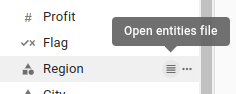
To do this, open the entities file for your class in Studio. You can find it by clicking on the list icon on the Studio sidebar next to the class name.
As an example, let's say you've opened the entities file for the Region class and saw this:
kb.Region {

    entity South_Europe_123 {
        name.en: "South Europe"

        id: "123"
    }

    entity North_Europe_124 {
        name.en: "North Europe"

        id: "124"
    }

    entity Central_Europe_125 {
        name.en: "Central Europe"

        id: "125"
    }
}
Now, assume we want to add new hierarchy nodes "Europe" and "EMEA" in order to model a hierarchy of regions.
To this end, we manually add two new entities "Europe" and "EMEA", and let the parent attribute of the respective child entities refer to their parents (e.g., "Europe" is the parent of "South Europe"). Note that:
- All leafs of the hierarchy (i.e., the entities without any children) must be assigned the tag
KB_HierarchyLeaf - All inner nodes of the hierarchy must be assigned the tag
KB_HierarchyNode - The new entities "Europe" and "EMEA" do not correspond to any value stored in the database, hence we do not set an
idattribute for them. Such entities are called virtual entities.
Resulting entities file:
kb.Region {

    entity South_Europe_123 {
        name.en: "South Europe"

        // Add this to all hierarchy leaves
        tag: KB_HierarchyLeaf

        // Specify the node in the next level of the hierarchy
        parent: Europe

        id: "123"
    }

    entity North_Europe_124 {
        name.en: "North Europe"

        // Add this to all hierarchy leaves
        tag: KB_HierarchyLeaf

        // Specify the node in the next level of the hierarchy
        parent: Europe

        id: "124"
    }

    entity Central_Europe_125 {
        name.en: "Central Europe"

        // Add this to all hierarchy leaves
        tag: KB_HierarchyLeaf

        // Specify the node in the next level of the hierarchy
        parent: Europe

        id: "125"
    }

    // Add this new entity manually
    entity EMEA {
        name.en: "EMEA"

        // Add this to all inner hierarchy nodes
        tag: KB_HierarchyNode

        // NOTE: No id is defined, as there is no corresponding value for "EMEA" in the data
    }

    // Add this new entity manually
    entity Europe {
        name.en: "Europe"

        // Add this to all inner hierarchy nodes
        tag: KB_HierarchyNode

        // The hierarchy can have multiple levels
        parent: EMEA

        // NOTE: No id is defined, as there is no corresponding value for "Europe" in the data
    }
}
Hierarchy present in the database
If the hierarchy is present in the database, you can use it to automatically generate the parent attributes of the entities.
To achieve this, ensure your database includes a column that specifies the parent for each row; rows without a parent should have NULL in this column. Then, you can add the hierarchy_column field to your class definition:
import db.public.region

kb {
    class Region {
        name.en: "Region"

        tag: [
            KB_HierarchyClass,
            KB_NonAggregatedHierarchyClass
        ]

        hierarchy_column: region.parent_region

        ...
    }
}
Classes with entities defined using custom entities sql can also have automatically generated hierarchies. For more details, please refer to that page.