Version Control with Git
Veezoo can connect a knowledge graph to a Git repository you own. Changes to the knowledge graph's definition (its VKL) can then be pushed to your repository, where they can be reviewed as a pull request before they go live - so you get version history, an audit trail, and an optional review workflow, using the same Git tooling your team already uses.
How it works
A knowledge graph's definition is written in VKL (Veezoo Knowledge Language). Once a Git repository is connected, Veezoo:
- Pushes the knowledge graph's VKL to a branch in your repository.
- Lets you propose changes from a development branch as a pull request in your Git repository.
- Pulls the changes merged in your repository back into your knowledge graph.
You connect the repository once; from then on Veezoo pushes your changes automatically, and you pull merged changes back from Veezoo Studio.
Requirements
A Git repository you can add a deploy key to. The examples below use GitHub, but any Git host that supports SSH deploy keys works - the Open pull request shortcut is GitHub-specific, but on other hosts you simply open the pull request yourself. Azure DevOps requires an RSA key and has no repository-scoped deploy keys - see Using Azure DevOps.
Connect and publish
-
Create a new, empty repository on your Git host (don't initialize it with a README, license, or
.gitignore). -
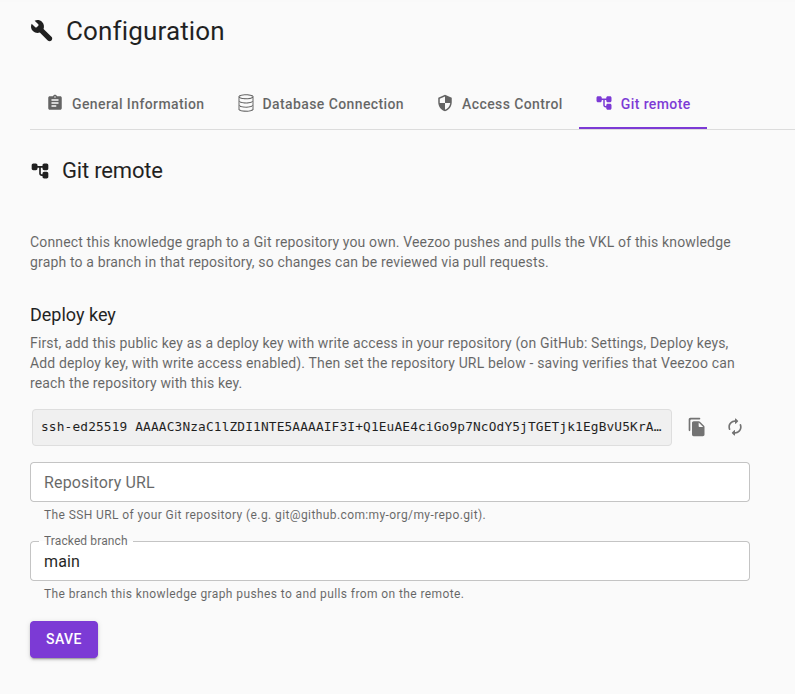
In Veezoo Studio, open your knowledge graph's configuration and select the Git remote tab.
-
Copy the deploy key shown at the top - an SSH public key Veezoo generated for this knowledge graph.
-
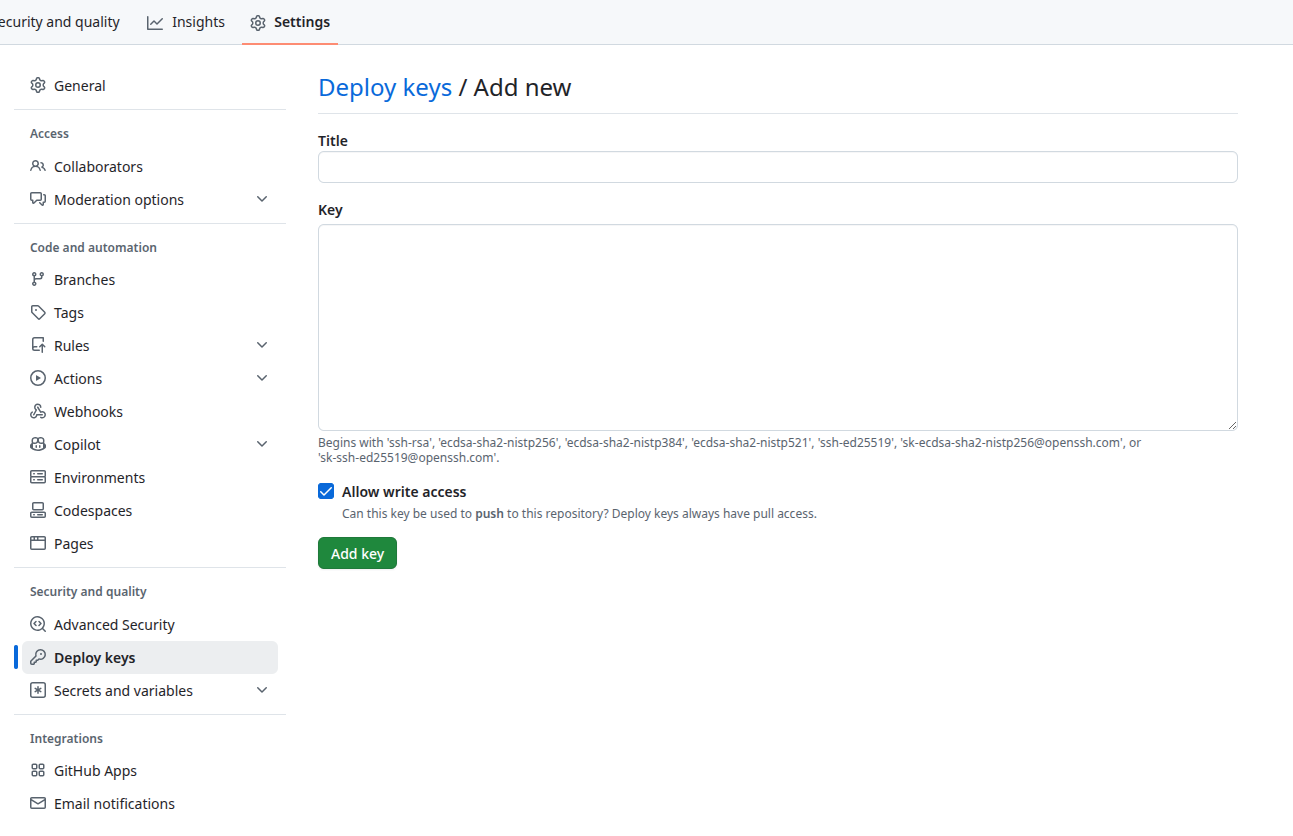
Add it to your repository as a deploy key with write access (on GitHub: Settings -> Deploy keys -> Add deploy key, with "Allow write access" enabled). Write access is required so Veezoo can push.
-
Back in Veezoo, set the Repository URL to your repository's SSH URL (for example
git@github.com:my-org/my-kg-repo.git) and the Tracked branch (defaults tomain), then click Save. Veezoo validates the connection - reachable, and the key has write access - before saving, and tells you what to fix if it can't connect. For a non-GitHub host, you first verify its SSH host key - see Verifying the SSH host key below. -
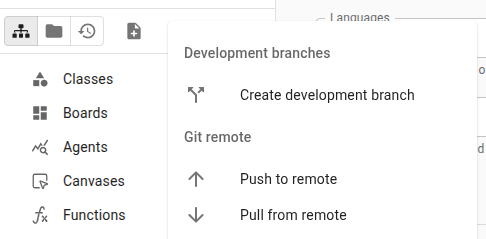
Once saved, Veezoo asks whether to push this knowledge graph to the remote - confirm to publish it. (If the repository wasn't empty, you are asked to confirm initializing the branch first - accept it.) From then on, every change you save to the Main branch is pushed automatically - as long as the push is a clean fast-forward. If the remote has moved ahead so the push would require a merge, the automatic push is skipped and the sync indicator flags it, so you resolve it with a manual pull. The sync indicator shows whether the remote is up to date, and you can push (or pull) manually at any time from the Git operations menu in the Studio editor.
A Connection section is always present, where you can Test connection at any time - including before saving - to check the remote is reachable and the deploy key has write access.
Verifying the SSH host key
The first time Veezoo connects to a non-GitHub host, it shows the server's SSH host key fingerprint and asks you to accept it. This is a one-time trust step (trust on first use): it confirms you are connecting to the real server and not to an impostor on the network.
- Set the Repository URL and click Test connection.
- Veezoo shows the fingerprint the server presented (for example
SHA256:47DEQpj8HBSa+/TImW+5JCeuQeRkm5NMpJWZG3hSuFU). - Compare it against the fingerprint published by your Git host - your host's documentation or administrator can
provide it; for a server you run yourself,
ssh-keygen -lf /etc/ssh/ssh_host_ed25519_key.pubprints it. Accept it only if they match: accepting a key you cannot verify defeats the check. - The accepted fingerprint then appears in a Host key section, and Save stores it. From then on Veezoo verifies the server against it on every push and pull, and refuses to connect if it changes.
GitHub hosts skip this step - Veezoo already ships with GitHub's host keys.
If the host key changes
If the server's host key legitimately changes - for instance the server was rebuilt - pushes, pulls, and tests fail with a host-key mismatch until you accept the new key. In the Host key section, click the refresh icon to fetch the current key, verify its fingerprint as above, accept it, and Save. If you did not expect the key to change, treat the mismatch as a possible interception and verify with your Git host before accepting.
Review changes via pull requests
To review knowledge-graph changes the same way you review code:
-
Create a development branch of your knowledge graph - Veezoo pushes it to its own branch in your repository automatically, leaving the Main branch untouched.
-
Make your changes - each change you save is pushed to that branch automatically, as long as the push is a clean fast-forward. If the remote branch has moved ahead so the push would require a merge, the automatic push is skipped and the sync indicator flags it, so you resolve it with a manual pull. The sync indicator in the editor shows whether the branch is up to date, and you can push or pull manually from the editor's Git operations menu (for example to recover if an automatic push reported a problem).
-
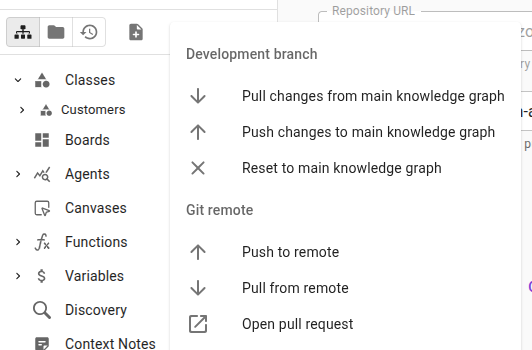
Click Open pull request to open a PR for that branch (on GitHub; on other hosts, open it yourself).
-
Review, discuss, and merge the pull request on your Git host, exactly like any other change.
-
Back in Veezoo, choose Pull from remote to bring the merged changes into your Main branch. If there are conflicting edits, a merge editor opens - resolve each conflict and click Continue to finish.
Rotating the deploy key
If you need to replace the deploy key - for instance because it was exposed, or as part of regular credential rotation:
- In the Git remote tab, click the regenerate icon (the circular arrow next to the deploy key).
- Pick the key type in the confirmation dialog - it preselects the current key's type, so simply confirming rotates the key without changing it. Ed25519 is Veezoo's default key type; choose RSA only for hosts that do not accept Ed25519 keys, such as Azure DevOps.
- Add the new public key to your repository (with write access) and remove the old one.
The previous key stops working as soon as you regenerate, so re-add the new one promptly.
Using Azure DevOps
Azure DevOps works with the same connect-and-publish flow, with three differences:
- The deploy key must be RSA. Azure DevOps only accepts RSA SSH keys, while Veezoo generates an Ed25519 key by default. Before connecting, regenerate the deploy key (the circular arrow next to it) and pick RSA in the dialog.
- There are no repository-scoped deploy keys. Azure DevOps attaches SSH keys to a user profile, not to a repository. Create a dedicated service account (so the connection doesn't depend on a personal account), give it the Contribute permission on the target repository only, and add the public key under that account's SSH public keys (avatar menu, top right).
- SSH keys can expire. Azure DevOps organizations enforce an SSH key expiration policy by default. When the key expires, pushes and pulls start failing with authentication errors - regenerate the key in Veezoo and re-add it (or have an administrator adjust the policy).
The repository URL has the form git@ssh.dev.azure.com:v3/{Organization}/{Project}/{Repository} - copy it from the
repository's Clone dialog under SSH. As a non-GitHub host, Azure DevOps goes through the usual
host key verification on first connect; Microsoft publishes the fingerprint to compare
on the SSH public keys page. The Open pull request shortcut is GitHub-specific - open pull requests in Azure
DevOps itself.
Security
- Veezoo generates a dedicated SSH deploy key per knowledge graph (Ed25519 by default, RSA for hosts that require it) and stores the private key encrypted; you only ever handle the public key, which you add to your repository.
- The deploy key needs write access so Veezoo can push, and on hosts with repository-scoped deploy keys it only ever reaches the single repository you add it to. Azure DevOps has no such scoping - the key is added to a user profile, so grant that account access to the target repository only.
- A knowledge graph's branches all use the same deploy key.
- For non-GitHub hosts, Veezoo pins the SSH host key you accept and checks the server against it on every connection, so a changed key blocks the connection until you review and accept it. GitHub host keys are built in.