Resolve Merge Conflicts
If you make use of development branches, edits you make in your current branch may diverge from the Main branch. Whenever you pull the most recent changes from the Main branch into your development branch, Veezoo tries to automatically merge any edits that have been made to the same set of files. Often, this works without additional user intervention. However, if the same set of lines has been edited both in the development and the Main branch, Veezoo aborts the operation with a merge conflict. Before you can continue the operation, you need to manually resolve these conflicts.
Interpreting Conflict Markers
If a pull operation fails with a merge conflict, a merge conflict editor tab is shown. All files with a merge conflict are listed there. Within each file, each individual conflict region is marked in color and formatted using diff3-style tags. Here is an example of a single merge conflict region in a file:
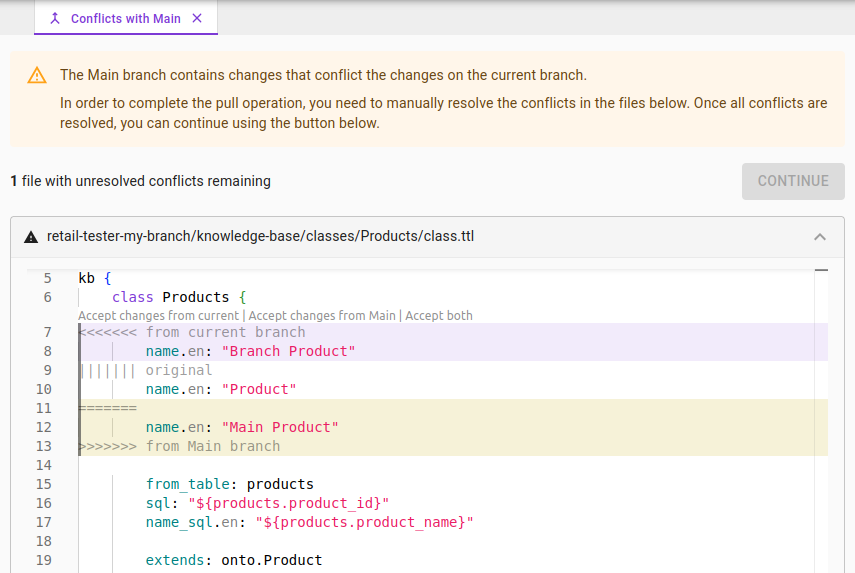
The conflict region is formatted in three sections:
- The first section, starting with
<<<<<<< from current branchand ending with||||||| original, shows the changes made in your current branch. - The second section, starting with
||||||| originaland ending with=======, contains the original version of the line(s) at the point in time the two branches started to diverge. In other words, this is the latest common state as seen in both branches. - The third section, starting with
=======and ending with>>>>>>> from Main branch, shows the changes made in the other branch that you are currently trying to merge in.
In our example, this means that the original file was looking like this:
kb {
    class Products {
        name.en: "Product"

        from_table: products
        sql: "${products.product_id}"
        name_sql.en: "${products.product_name}"

        extends: onto.Product
Since then, we have edited the name of the product on our branch as follows:
kb {
    class Products {
        name.en: "Branch Product"

        from_table: products
        sql: "${products.product_id}"
        name_sql.en: "${products.product_name}"

        extends: onto.Product
Independently, someone has edited the name of the product on the Main branch in a conflicting manner as follows:
kb {
    class Products {
        name.en: "Main Product"

        from_table: products
        sql: "${products.product_id}"
        name_sql.en: "${products.product_name}"

        extends: onto.Product
Resolving Conflicts
Each marked conflict needs to be resolved manually. Inspect the three sections and decide what merged result should be used. You can choose from different options:
- You can use the quick resolution controls shown above the conflict region:
- Accept changes from current: Keep the changes on your branch, discard incoming changes
- Accept changes from main: Take changes from Main, discard your changes
- Accept both: Combine changes from both branches (when non-conflicting)
- If you want to use a different, manually adapted version, you can use the editor directly to replace the conflict region (including the marker tags
<<<<<<,|||||||, etc.) with arbitrary new content.
For example, we can use the merged name "Merged Product" by replacing the conflict region as follows:
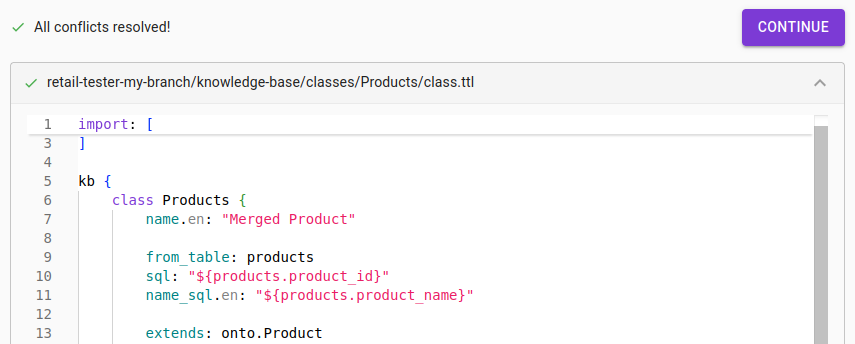
Once all conflicts in all files have been resolved, the "CONTINUE" button allows you to finalize the merge operation.