
Transferring Board Ownership
To facilitate the maintenance of boards, admins can transfer the ownership of one or more boards from one user to another. This is particularly useful when a user leaves the organization, changes roles, or otherwise needs to pass control of their boards on to someone else e.g. for support.
You can access the interface in Veezoo Admin under Board Transfer.
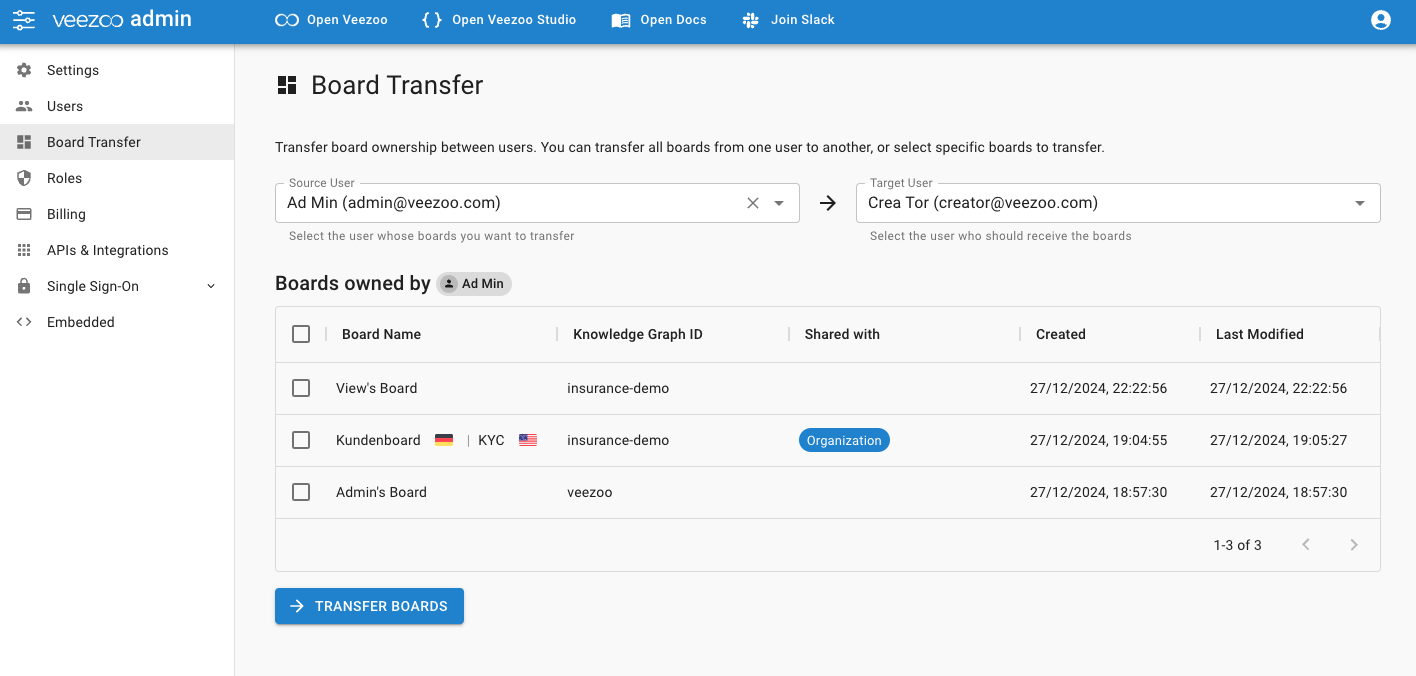
How It Works
Veezoo allows users with access to Veezoo Admin to take boards currently owned by a specific user (the "source") and transfer them to another user (the "target"). Once transferred:
- The target user becomes the new owner of the selected boards.
- Any sharing settings remain intact. Users who had read access to the board still have read access after the transfer.
- The previous owner no longer has edit rights to the transferred boards (since ownership has changed).
What happens after a transfer?
After the transfer completes:
- The Target User is now listed as the owner of the transferred boards.
- The boards will appear in the Target User’s sidebar
- Any users or roles that had read access still retain read access (sharing settings remain the same).
Frequently Asked Questions (FAQ)
Can I undo a board transfer?
No, there is no “undo” for ownership changes. If you have transferred boards to the wrong user, simply repeat the process and choose the correct target user.
Do the newly transferred boards appear immediately?
Yes, the boards should appear immediately for the target user.
Can I transfer boards even if I’m not an Admin?
Board transfers require Admin permissions. If you don’t have access to the Board Transfer page, contact your Veezoo administrator.
Do the boards keep their sharing links?
Yes, the sharing configuration remains intact. The only difference is who can edit or delete the board (the new owner).